
LofiVinyl 0.6.2: collect your favorite CDs as records
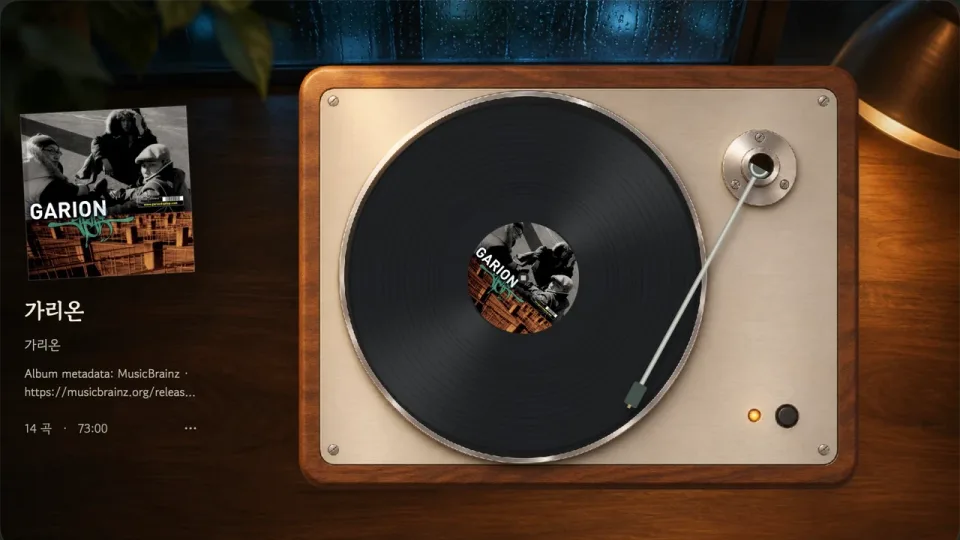
Your favorite CDs can now become a collection of records with their own sleeves. Pick an album, place it on the turntable and lower the needle. Familiar music comes with the small pleasure of choosing and handling a record. That is where CD importing in LofiVinyl 0.6.2 (43) leads.
Starting with my Garion CD
I imported my Garion CD from the beginning. Its 14 tracks became one Vynil, complete with the album sleeve. The screenshot above shows the sleeve beside the turntable and the same artwork on the record label. There is something satisfying about seeing the collection grow one album at a time.
I wanted to keep choosing whole albums, looking at their sleeves and lowering the needle while listening to music from my CDs on a Mac. Collecting favorite CDs as records and enjoying them this way is my favorite part of the update.
From the CD to its sleeve
Connect a CD drive, insert an audio CD and open CD Import. Tracks are saved as lossless Apple Lossless (ALAC) M4A files. Choose the matching MusicBrainz release to bring in album, artist, track titles and numbers, or enter them yourself if no match is available. Enable “Import album cover too” to apply an available front cover as the Vynil sleeve. You can also choose your own sleeve later.
The MusicBrainz integration is provided with permission from MetaBrainz, acknowledged in the app’s licenses and credits. MusicBrainz supplies album information, while Cover Art Archive supplies artwork. The Garion sleeve came from this release’s Cover Art Archive. Metadata permission and cover-image copyright are separate.
Tracks are saved individually. Completed tracks remain after cancellation, and retrying the same CD skips tracks already imported. Enable automatic eject to open the tray after the final track. I checked the complete import and actual tray opening with the Garion disc. Avoid importing the same CD in Music and LofiVinyl simultaneously.
Available on itch.io and the blog store
CD importing is included in the direct editions from itch.io and this blog’s store. It is not included in the Mac App Store edition. Full and free Lite are both updated to 0.6.2 (43). Lite keeps one user album, shared across local audio, YouTube and CDs, alongside bundled samples. Full keeps multiple albums.
You need macOS 14 or later, Apple Silicon (M1 or newer), and a drive whose audio CDs are recognized by macOS. Both apps are Developer ID signed and Apple-notarized. Quit the previous app and replace it with the new one. Metadata and artwork lookup require internet access; imported music plays locally. AccurateRip comparison and a secure ripping mode are not included.
Garion was the first. Now I plan to bring over the CDs I already own, one by one. As those favorite albums fill the record collection, choosing something to listen to should become part of the pleasure.
Download Mac Full or free Lite on itch.io · Buy Mac Full in the blog store · LofiVinyl features and requirements
Related articles
Refining LofiVinyl's record noise and warmth
I replaced the surface noise with a real CC0 blank-groove recording and added warmth control to Android.

Starting the Android version of LofiVinyl
I set up a separate Flutter workspace and checked music import, playback and mobile controls.

Separating LofiVinyl's distribution editions
I separated features, libraries and notices so each distribution channel describes the edition people actually install.
LofiVinyl
The macOS version is available on itch.io.