
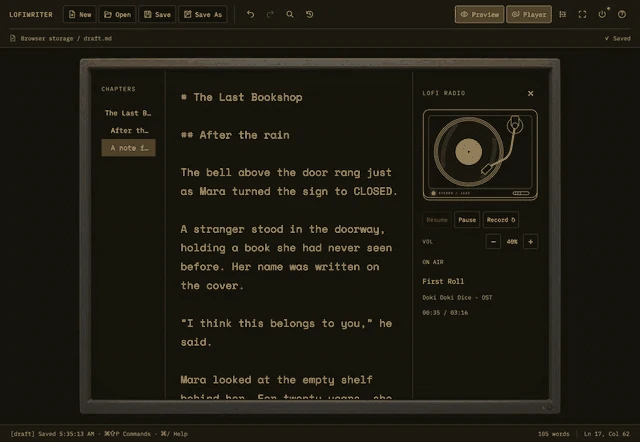
LofiWriter, an app for focused writing and draft management, launched on Product Hunt on November 11, 2026. Made by Ebakssa Studio, it puts a little record player beside the manuscript so you can listen to music as you write the next sentence. Here is the idea behind the app, what it does, and how to try a free edition before buying.
Explore LofiWriter on Product Hunt →
A quiet desk for focused writing
LofiWriter starts with a screen that feels inviting to write in: a manuscript and a little music while you work on a scene, a blog draft or a note. The CRT-style display and soft typing sounds help set that atmosphere. Alongside the visual design, it includes tools for saving and revising a draft.
The record on the right is a working player. Its offline radio plays 12 bundled tracks from the Doki Doki Dice OST. Music can keep playing while you write, even if you hide the player with the toolbar’s Player button. Music and typing sounds have separate volume controls. The official feature page shows the interface and explains playback.
Write, find a scene and compare revisions
The app includes practical tools for continuing a manuscript:
- Local drafts: Markdown and text files stay on your computer, with autosave.
- Heading navigation: Give chapters and scenes headings, then jump to them from the list.
- Snapshots and comparison: Save the state of a draft before a substantial rewrite and compare it with the current version.
- Search and shortcuts: Find passages and run commands through the command palette.
- English and Korean: Both interface languages and bundled fonts are included.
For example, you can take a snapshot before rewriting a scene, then use the heading list to move to the next one. Ordinary Markdown and text files also let you bring the same draft into other editing tools. See the official LofiWriter page for the feature details.
Choose a CRT screen or plain paper
There are five themes: Black & Gray, Green Terminal, Amber, DOS Blue and Paper. Scanlines and glass effects are adjustable and can be switched off. You can also remove the monitor frame to give the manuscript more room. Music and typing sounds are optional, so the same app can suit a retro display or a simpler paper-like writing surface.
Watch actual typing and player controls in the LofiWriter demo video and app overview.
Try a free edition with one manuscript
You can try the app with a real draft before buying. Choose LofiWriter Lite for Mac or the free Demo for Windows. These details were checked against the official download page on November 11, 2026.
| Edition | What is included for free | Requirements |
|---|---|---|
| Mac: LofiWriter Lite | One manuscript, autosave, snapshot history, Export Copy and the full offline radio. No time limit | macOS 11 or later; Apple Silicon and Intel |
| Windows: Demo | One manuscript, all five themes, the full radio, typing sounds, autosave and snapshots | Windows 10 version 1803 or later, or Windows 11; 64-bit; WebView2 required |
- Open LofiWriter on itch.io.
- Find Download demo and choose Mac Lite or Windows Demo.
- Pick a theme and start with a scene from something you are already writing.
The Mac downloads are Developer ID signed and Apple notarized. The Windows installer is not yet code-signed, so SmartScreen may show an unknown-publisher notice. Check the installation instructions on the official page.
The full edition adds multiple manuscripts, New, Open, Save As and manuscript switching. An itch.io purchase includes Windows and Mac downloads together. A Mac edition is also available through the blog’s direct store. Check each store for its current prices and offers.
Join the discussion on Product Hunt
The launch page includes app screenshots and the story behind its development. If you are looking for a writing app, explore LofiWriter on Product Hunt and share your experience or questions. Specific feedback helps guide improvements: which theme is comfortable, whether you keep music playing, or what would make revising a draft easier.
Try writing a scene in the free edition, and let Ebakssa Studio know what you would like this writing space to become.
Comments and questions
Post, edit or delete a comment using a name and password. Use a password you do not use elsewhere.