
A game can run correctly while leaving you unsure what to improve first. The sakurai skill gives Claude Code guidance for reviewing controls, onboarding, rewards and sound. It is a Japanese fan-made collection by kociden, based on Masahiro Sakurai’s game-development videos.
Watch the creator’s introduction — about 100 seconds · Open the playable Hajiki example
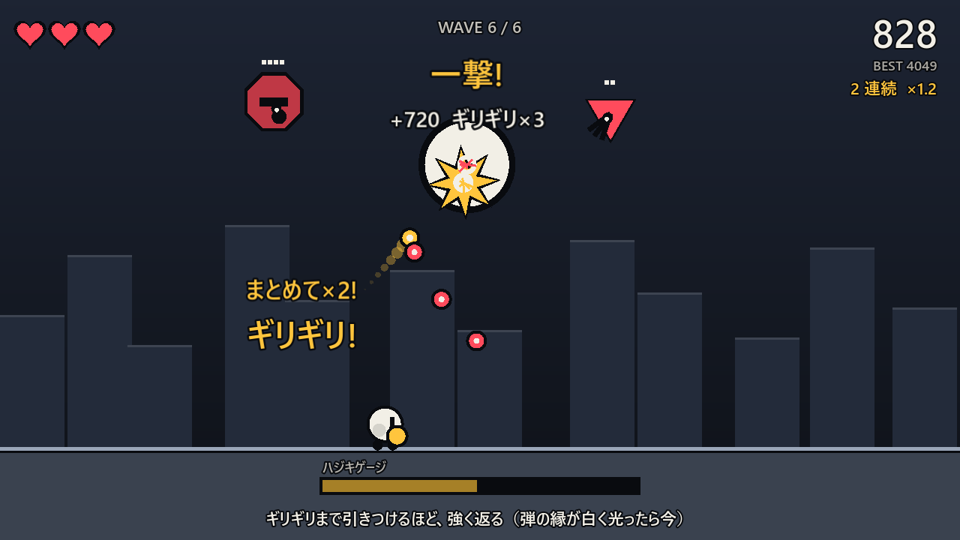
The screenshot above comes from a Godot action game the creator presents as an application of the skill. Reflecting an incoming bullet at the last moment produces a stronger counterattack. The video shows the game alongside installing the skill, asking for improvements and reviewing them again. Development and skill-use notes
What can it help you improve?
The example’s development notes cover more than visual effects. They consider what the player does first, how quickly play resumes after failure and how sound communicates important actions.
- First play: The title screen itself lets players learn the controls by reflecting bullets, before a lengthy explanation.
- Game feel: Brief hit stops and reactions accompany impacts, and pressing a button when an action is unavailable still produces feedback.
- Sound: Effects are given different priorities and volumes for events such as a hit, defeat or damage.
These are features described in the creator’s published example. For your own game, describe the current problem and genre before requesting a review. The skill is kociden’s fan-made summary; it is separate from Masahiro Sakurai or Sora’s official releases. Project introduction
Install by copying the skill folder
With Claude Code and Git ready, run the following in a Mac or Linux terminal. These steps follow the creator’s installation guide. Read the repository and skill instructions before applying them.
git clone https://github.com/kociden/sakurai-skill.git
mkdir -p ~/.claude/skills
cp -R sakurai-skill/skills/sakurai ~/.claude/skills/
Open your game project in Claude Code and request the skill with /sakurai. The official Claude Code documentation explains loading personal skills from ~/.claude/skills/. The following prompts are examples written for this article to review your own game.
Ask for just three priorities first
/sakurai Review the first 30 seconds of this game.
Check whether the player understands what to do, whether input gets a response,
and whether important actions are clear through visuals and sound.
List only the first three improvements, with reasons and ways to check them.
Include the source video numbers and titles. Do not edit code yet.
Choosing a scene to inspect makes suggestions easier to compare than a vague “make it more fun.” Pick one suggestion, then specify the scope and result you want.
Apply only the first suggestion.
Keep the current rules and character art.
Change the input response, hit indication or sound effects as needed.
Explain what I should compare before and after the change.
The previously covered game-feel skill focuses on impact and feel. This collection takes a broader view of onboarding, difficulty, rewards, UI and audio. Choose one troublesome scene, make a change and play it yourself before applying every suggestion.
Check the original videos too
The Japanese reference material includes original video numbers and titles. When a suggestion interests you, follow it back to Sakurai’s official channel and judge how it fits your game. Installation and content were checked on November 14, 2026. Claude usage costs depend on your plan.
I found the topic in kociden’s November 12 introduction on X. It displayed 4,263 likes and 5,952 bookmarks when checked on November 14. This article quotes one creator-published game screenshot and links to the original demonstration and playable example.

Comments and questions
Post, edit or delete a comment using a name and password. Use a password you do not use elsewhere.